
Sage 100 2026.0 delivers a broad set of enhancements and new features, including for user experience, inventory tracking, security administration, paperless office workflows and more — many of which were driven directly by customer and partner feedback on previous live and test versions. SWK Technologies has put together this guide to help your business understand what has changed with this latest release of your Sage 100 ERP and what you need to do before upgrading:
Installation Changes: Sage 100 2026.0 64-bit Only
Version 2026.0 is a 64-bit only application, which means that if your business still runs a 32-bit installation of Sage 100 (2021–2025), that instance will be replaced by v2026 in your IT environment. Sage recommends converting existing 32-bit installs using the 32_64_Bit_Switch_Utility.exe before proceeding; if that is not feasible, version 2026 must be installed on a separate server with no prior 32-bit version present.
This change also has downstream implications for third-party integrations written in 32-bit, connected services that depend on legacy Microsoft platforms and Application Server configurations — all of which will require review before upgrading.
Desktop Changes and Global Enhancements
Here are some of the updates version 2026 adds across the ERP:
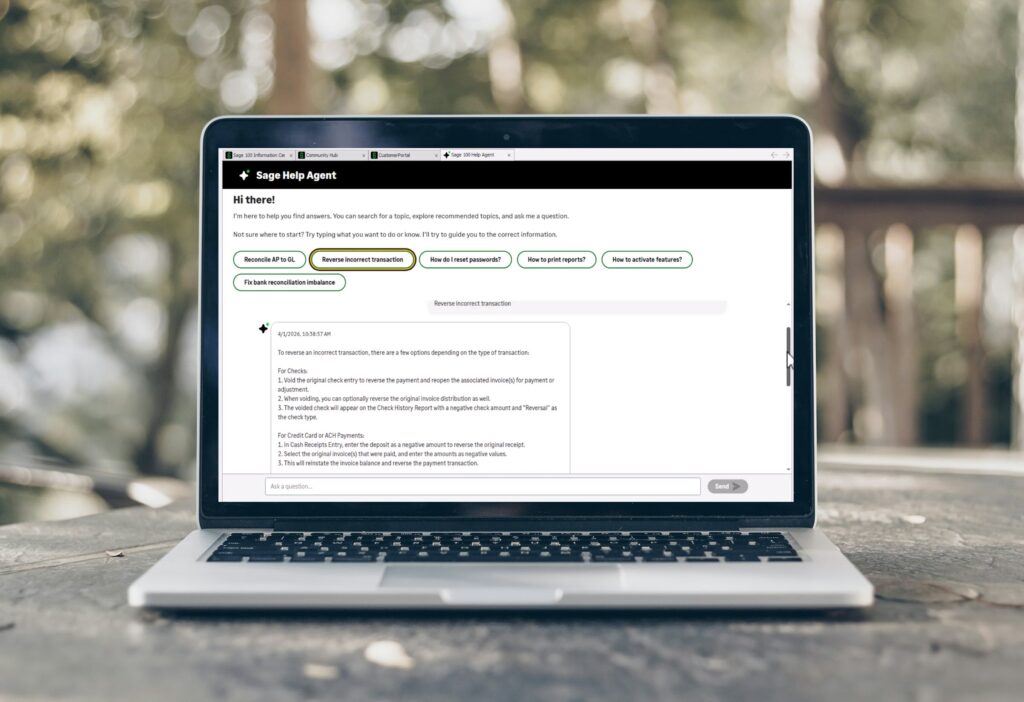
Sage Help Agent
Sage 100 2026.0 introduces an AI-powered Sage Help Agent accessible from the Home tab. Users can type a question into the agent’s search bar and receive guided navigation to the relevant section of the Help module, rather than searching documentation manually. The agent is also available from the Information Center page.
Global Search
A new Global Search button on the Home tab allows users to query data across the system in a single step. For example, you can search for all inventory items assigned to a specific default warehouse or pull up every accounts receivable invoice tied to a specific salesperson, without opening individual modules.
Expanded Lot/Serial Number Field
The lot/serial number field has grown from 15 to 50 characters across Accounts Receivable, Bill of Materials, Common Information, Inventory Management, Mobility for Bar Code, Production Management, Purchase Order, Return Merchandise Authorization, and Sales Order. A new Zero Fill Lot/Serial Number checkbox in Inventory Management Options lets you automatically pad numeric lot/serial numbers with leading zeros. A Lot/Serial Number Conversion Utility has also been added to the Utilities menu for businesses that want to apply that new length to existing numeric records.
NOTE: existing lot/serial numbers are not automatically converted. The utility must be run manually.
Expanded Price Level and Package Tracking Fields
The Price Level field has expanded from 1 to 15 characters across Accounts Receivable, Customer Relationship Management, Inventory Management, eBusiness Manager, Job Cost, Return Merchandise Authorization, and Sales Order. The Sales Order Package Tracking Number field has grown from 30 to 40 characters to accommodate longer tracking identifiers from carriers such as FedEx Ground and DHL eCommerce.
User Interface Improvements
Hyperlinks to related tasks — such as Vendor Inquiry or Customer Inquiry — have been added in A/P Invoice History Inquiry, A/R Invoice History Inquiry, and RMA Inquiry. A Show/Hide button has been added next to each password field so users can verify entries before tabbing off. The User Lookup Wizard now includes an “Is Empty” filter option in the Operand field for custom filters, and a Print button has been added to export the full Lookup Listing including all modified lookups. Tables that contain user-defined fields now display a [UDF] tag in User-Defined Field and Table Maintenance for quicker identification.
Inventory Management
Here are changes added to the Inventory Management module for Sage 100 2026.0:
FDA Food Traceability List (FTL) Tracking
Businesses subject to the Food Safety Modernization Act (FSMA) can now track lot code source and country of origin for items on the FDA Food Traceability List. The lot code source is a 50-character alphanumeric field identifying where an original lot code was assigned. The Enable Tracking of Lot Code Source checkbox has been added on a new Lot/Serial tab in Inventory Management Options, and the Lot Code Source History Report is available on the I/M Reports menu.
NOTE: This feature requires the subscription version of Sage 100, formally known as Sage 100cloud or Sage 100c.
Inventory Quantity Available Metrics
Two new options have been added to the Include in Quantity Available field: Required for W/Ts and POs and Required for W/Ts. These options calculate available quantity using only the materials required for work tickets — separating raw material availability from finished goods availability to avoid overstating either figure.
Product Line Maintenance Workflow
The tab order in Product Line Maintenance has been updated — Lot/Serial is now the second tab, and Accounts is the third — to better reflect a typical user workflow.
Inventory Requirements Planning
Here is what has been updated for the Inventory Requirements Planning module:
Warehouse Groups
Warehouse Group Code Maintenance has been added as a new task on the Setup menu. Warehouse groups allow the IRP Generation process to consolidate material acquisition recommendations or suggest inventory transfers between locations. This functionality previously existed in the Material Requirements Planning module and has now been brought into IRP. Warehouses can be designated as Standard or Transfer types, and grouping must be enabled in Inventory Requirements Planning Options.
Library Master
The Library Master module received several updates for system and user settings:
Enhanced Password Validation and Security
Password validation settings in System Configuration are now enabled and selected by default in Sage 100 2026.0, regardless of whether passwords are required. A Maximum Hours Session Can be Inactive field has been added to automatically log out users after a configurable period of inactivity.
Audit Tracking for Roles and Users
An Enable Audit Tracking for Role and User Maintenance checkbox has been added in System Configuration with v2026. When enabled, the system retains an audit trail of all changes, deletions and additions to role and user records. New Role Audit Report and User Audit Report tasks appear on the Reports menu, and an Audit Viewer button is available within Role Maintenance and User Maintenance for users with appropriate permissions.
Paperless Office
Sage 100 Paperless Office received a significant number of updates and new features:
Consolidated Emails for Customers and Vendors
Multiple forms can now be combined into a single email for a specific customer or vendor. For example, 10 invoices sent to the same customer will be delivered as one email rather than 10 individual messages. Options include zipping multiple PDFs into a single attachment, and delivery can be scheduled via Task Scheduler. New tasks — Deliver Consolidated Customer E-mails and Deliver Consolidated Vendor E-mails — have been added to the Paperless Office Main menu.
Sales Order Picking Sheets to PDF
Sales Order picking sheets can now be printed to PDF and emailed to warehouse recipients. Default email recipients per warehouse are configured through a new Paperless Office Delivery Options task in Warehouse Code Maintenance. Picking sheets can also be routed to the customer if needed.
Scheduled Email Attachments
A Scheduled Attachments button has been added to the Form Maintenance Main tab, allowing users to configure recurring attachments to accompany specific form emails.
Email Message Improvements
Electronic Delivery Message Maintenance now supports document-level message customization within a document group. For example, a credit memo and a debit memo in the S/O Invoice group can each have their own unique message. A Copy From button has been added to duplicate existing message records as a starting point.
Journal and Register PDF Access
A new Role Maintenance security option allows users without task permissions to view Journal and Register PDF documents.
Production Management
Here is what has been added to Production Management (formerly known as the Sage 100 Work Order module):
Material Shortage Report Update
The Material Shortage Report now includes an option to print items where all entries carry a quantity short of zero, giving production managers more control over what appears in the report.
Purchase Order
Here is how the Purchase Order module was updated:
Cancellation Code Prompt
The Cancel/Reason Code Req When Deleting Orders/Quotes field has been updated to allow users to skip the cancellation code prompt when a cancel/reason code is not required at the time of deletion.
Sales Order
Here is a list of updates for the Sales Order module:
Order and Invoice Totals
An Order Total field has been added to the Sales Order Entry Payment tab, visible when entering a credit card deposit. An Invoice Total field has been added to the S/O Invoice Data Entry Payment tab.
Lot/Serial Information on Packing Lists
The S/O Additional Packing List form now supports printing lot/serial information — including lot code source and country of origin — for individual line items.
Cancellation Code and Memo Access
The Sales Order module has received the same cancellation code prompt update as Purchase Order. Additionally, a Memo button has been added next to the Order Number field in Shipping Data Entry; it is enabled through Memo Manager Maintenance.
Suppressing System Messages
Role Maintenance now includes options to suppress the Zero Cost Warning message for miscellaneous and special items, and to suppress the purge confirmation message after printing the Daily Shipment Report.
Visual Integrator
Sage 100 Visual Integrator received several new features and updates:
Expression Builder and Import Field Properties
The Expression Builder now inserts selected fields or operators at the cursor position in the Expression Text field, and the less than (<) and greater than (>) signs have been added to the Functions & Operators list. Two new operations — Add Value and Subtract Value — have been added in Import Field Properties for use with numeric and date fields.
Sage Supply Chain Intelligence Integration
New sync controls allow users to specify which purchase orders flow from Sage 100 to Sage Supply Chain Intelligence at both the vendor level and the individual purchase order level. The vendor-level control is set in Vendor Maintenance; the purchase order-level control is set in Purchase Order Entry and is viewable in Purchase Order History Inquiry.
Migrate to Sage 100 2026 with SWK Technologies
SWK Technologies has decades of experience helping businesses navigate Sage 100 version upgrades, from pre-upgrade environment assessments to post-migration support. Whether your team needs help evaluating third-party compatibility, planning a cloud hosting environment to stage the transition or simply confirming which version path makes sense for your setup, our consultants are available to guide you through it.
Contact SWK here to discuss your Sage 100 2026 upgrade timeline and learn how our team can support a smooth transition.