
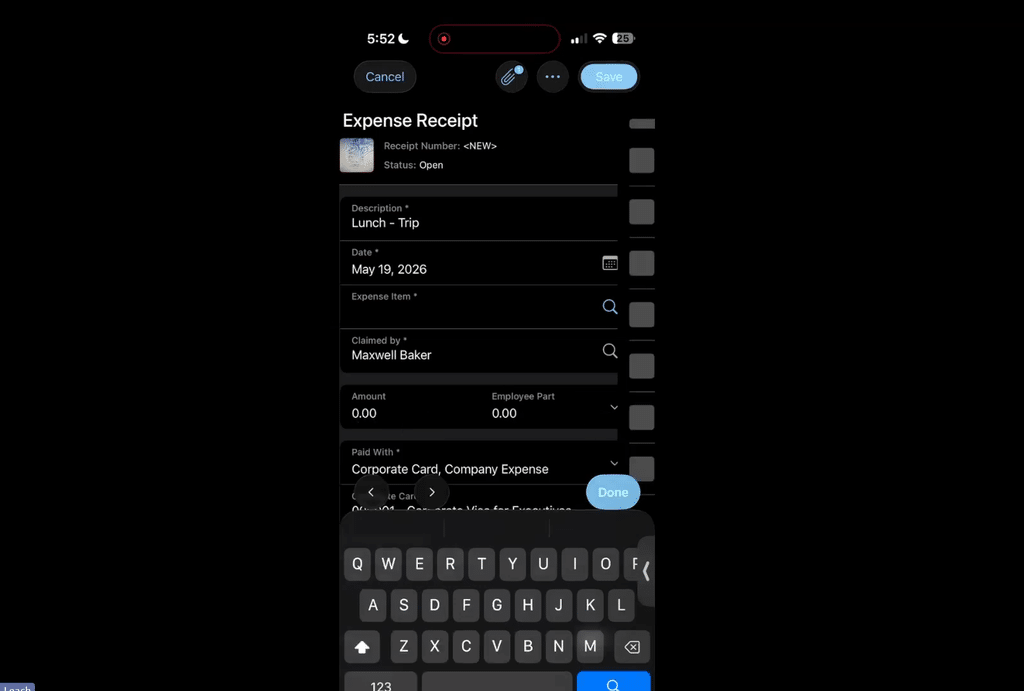
Employees who travel for work collect a stack of paper receipts that get lost, crumpled or forgotten (usually at the bottom of a laptop bag) long before anyone sits down to build an expense report. Accounting then spends month-end tracking down missing receipts and re-keying amounts that should have been captured on the road. Acumatica eliminates most of that cleanup by letting your team record each receipt from a phone and roll it into a claim for approval without waiting to get back to the office.
This walkthrough of expense management in the Acumatica mobile app, put together by the Acumatica consulting team at SWK Technologies, will help your business get more out of the tools you already have:
Expense Receipts vs Expense Claims
An expense receipt records a single purchase made on behalf of the business, such as an airline ticket, a hotel stay or a meal on the road. An expense claim rolls one or more of those receipts into a single document, so a trip with 15 separate receipts reaches the approver as one claim. Both live in the Time and Expenses workspace of the mobile app, next to the Approvals tile managers use to act on submitted claims.
Expense items act as the categories behind every receipt, and your business can set up as many or as few as it needs, from airfare and lodging to rental cars and business meals. A short, clearly named list makes it easier for employees to pick the right item from a phone screen while they wait at the gate.
Receipt Capture from Your Phone
Tapping the camera icon on the Expense Receipts list lets you photograph a receipt and start the record from the image instead of typing it from scratch. With the Image Recognition for Expense Receipts feature licensed and enabled, Acumatica reads the photo and fills in the values it recognizes before the employee saves the record, an option currently limited to U.S. and Canadian customers. Without that feature turned on, the employee fills in the description, expense item and amount by hand from the photo.
Each expense item determines the general ledger accounts a purchase posts to, which keeps a lunch on the road from landing in the wrong account. The Paid With field records whether the employee covered the cost personally or put it on a corporate card, which tells accounting who owes whom once the claim is released. Purchases tied to customer work can be linked to a project and task and marked billable, so the cost passes through to that customer’s invoice.
Corporate Card Transactions and Bank Feeds
Corporate card activity can skip manual entry entirely, since Acumatica can generate expense receipts from credit card charges pulled in through bank feeds connected to more than 14,000 financial institutions. Smart matching categorizes each imported charge and posts it to the right general ledger account, and employees get an email or text reminder when a card charge is still missing its receipt.
Acumatica 2026 R1 added automatic imports for American Express corporate card charges, which takes manual entry out of company card programs with heavy monthly volume. Every card feed update is logged at the record and field level, giving your controller a trail for each imported charge. Card charges and out-of-pocket purchases then follow one approval path, giving managers a single queue to work through instead of two.
Expense Claims from Open Receipts
The Claim All action on the Expense Receipts list gathers every open receipt into claims in one step, with Acumatica adding up the totals automatically so no one has to do the math. Receipts tied to different customers or branches split into separate claims, which keeps billable expenses connected to the right customer when accounting processes them later. A quick update to the claim description tells approvers which trip or project the expenses belong to before the employee submits it.
Receipt and Claim Status Tracking
Every receipt and claim carries a status, from On Hold and Open through Pending Approval, Rejected and Released, so employees can see where each expense sits without emailing accounting. Filters at the top of the Expense Receipts and Expense Claims lists narrow the view to a single status, which makes it easy to find the receipts still waiting to be claimed before a trip closes out. Released claims keep their receipts and attached images on file, giving auditors a record that runs from the original photo to the AP bill behind each reimbursement.
Claim Approval and Release
Submitted claims move to Pending Approval when the Approval Workflow feature is turned on, and approvers can approve or reject them from the Approvals tile on their phone without logging in at a desk. Releasing an approved claim generates the accounts payable documents behind it, turning out-of-pocket purchases into an AP bill that reimburses the employee. Company expenses charged to a corporate card post as cash purchases instead, while personal charges on a company card create an AP debit adjustment so the employee pays the business back.
Businesses with multiple branches get cleaner reporting in Acumatica 2026 R2, which records expense receipt costs under the project’s branch while the liability stays with the employee’s home branch. Staff who travel for another office’s project no longer muddy that office’s books or their own.
Learn More About Acumatica Expense Management with SWK Technologies
Mobile expense entry is one of many Acumatica features that can take manual work off your accounting team once it is configured to match your expense policies. As a four-time Acumatica Cloud ERP Partner of the Year, SWK Technologies will help you set up expense items, approval maps and receipt recognition so your traveling employees can submit claims from anywhere without chasing down paper receipts.
Contact SWK here to learn more about Acumatica mobile expense management and discover how to get more value from your Acumatica implementation.