
• Skip to main content
  • Skip to header right navigation
  • Skip to site footer
  • X
  • Facebook
  • YouTube
  • LinkedIn
Screen Connect
Support
Customer Portal
Pay Online
SWK logo.

SWK Technologies

Software Solutions & Services

  • Accounting & ERP Software
      • Acumatica Cloud ERP
        • Overview
        • Construction
        • Distribution
        • Field Service
        • Financial Management
        • Manufacturing
        • Professional Services
        • Project Accounting
        • Retail-Commerce
      • Sage Intacct
        • Overview
        • Construction and Real Estate (CRE)
        • Distribution Operations for Sage Intacct
        • Financial Services
        • Healthcare
        • Manufacturing Operations for Sage Intacct
        • Nonprofits
        • Professional Services
        • Sage Intacct Payroll powered by ADP
      • Sage 100
        • Overview
        • Business Intelligence
        • Core Accounting & Financials
        • Distribution
        • Manufacturing
        • Payroll
        • Sage 100 Contractor
      • More Accounting Products
        • QuickBooks
        • Sage 50
        • Sage 300
        • Sage 500
        • Sage BusinessWorks
      • ERP Add-ons
        • ADP Workforce Now
        • Avalara
        • AvidXchange
        • BILL
        • BigCommerce
        • CIMCloud
        • Cloud Hosting
        • DataSelf
        • DocLink
        • Endpoint Automation Solutions
        • Fortis
        • FreightPOP
        • Lumber
        • Microsoft 365
        • Netstock
        • Quadient
        • Sage Fixed Assets
        • Sage HCM
        • Sage Intacct Payroll powered by ADP
        • Sage Supply Chain Intelligence
        • Savant WMS
        • ScanForce
        • Solver
        • SPS Commerce
        • Velixo
        • Workforce Go!
      • More ERP Add-ons
        • Azure
        • ConverSight
        • Copilot
        • Crystal Reports
        • EbizCharge
        • KnowledgeSync
        • Nuvei
        • Nectari
        • Ottimate
        • Pacejet
        • Planning Maestro
        • Sage CRM
        • Sage HRMS
        • Sage Intelligence
        • Service Pro
        • ShipStation
        • Shopify
        • STACK
        • Starship
        • Sugar CRM
        • Traild
      • Industries
        • Construction
        • Distribution
        • Financial Services
        • Healthcare
        • Manufacturing
        • Nonprofit
        • Professional Services
        • Retail
  • Managed Cloud Services
      • Managed IT Services
        • Managed Cloud Services
        • Network Assurance Core
        • Co-Managed IT
        • Email Hosting
        • IT Support
        • Microsoft 365 Services
        • Server Monitoring
        • Virtualization
      • Cybersecurity
          • CyberAssurance CORE™
          • Cybersecurity Solutions
          • Backup & Continuity
          • Compliance
          • Dark Web Monitoring
          • EDR
          • Encryption
          • MDR
          • MFA
          • Penetration Testing
          • Security Training
          • SOC
          • Spam & Virus Filtering
          • vCIO
          • Vulnerability Assessment
      • Cloud Services
        • Secure Cloud Hosting
        • Azure Services
        • Infrastructure-as-a-Service
        • Acumatica IaaS
      • Industries
        • Financial Services
        • Healthcare
        • Construction
      • Locations
          • Nationwide
          • Austin
          • California
          • Chicago
          • Minneapolis
          • New Jersey
          • New York
          • North Carolina
          • Philadelphia
          • Phoenix
          • San Diego
          • Seattle
  • Consulting & Implementation
    • Business Technology Consulting
    • eCommerce
    • Financing
    • Human Capital Management
    • Managed Cloud & IT Services
    • Channel Partner Program
    • Referral Partner Program
    • Software Development
    • Software Implementation
  • Resources
    • Help Desk
    • Blog Posts
    • Payments Portal
    • Webinars
    • YouTube Channels
    • Acumatica Resources
    • Sage Intacct Resources
    • Sage 100 Resources
    • IT Resource Pages
  • About
    • About SWK
    • Awards & Recognition
    • Life@SWK
    • Careers
    • Success Stories
    • SWK Gives
  • Contact
    • Contact Us
    • Support
    • Our Locations

Acumatica Time Cards – Demo and Walkthrough

November 17, 2026 by Hector Bonilla

Home » Training » Acumatica Time Cards – Demo and Walkthrough

Time entered days after the work happened is rarely accurate, and those errors flow straight into payroll, project costing and the invoices you send to customers. Employees reconstructing a week of hours from memory (usually late on a Friday) will round off hours and forget short tasks, leaving supervisors to approve numbers nobody can verify.

Acumatica’s time card features let employees log hours from a browser or the mobile app as the week goes, tagged to the right projects and cost codes before they ever reach an approver. This walkthrough, taken from demos put together by the Acumatica consulting team at SWK Technologies to show how time cards work from the first entry of the week through supervisor approval.

Here is how each step works in a browser or on your phone:

Enter Time in Acumatica from the Employee Dashboard

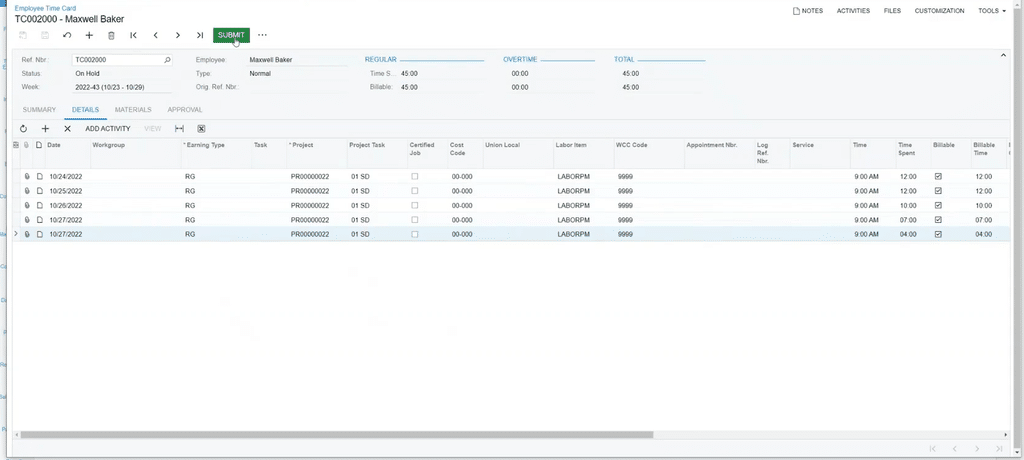
Employees open the time card straight from their dashboard, where it sits next to expense reports and assigned tasks so logging hours becomes part of the daily routine. Each card covers a weekly, biweekly, semimonthly or monthly period depending on how the employee record is set up, with one row added per activity.

Project rows carry a project, task and cost code that feed directly into project accounting, while internal work gets the non-project code instead. Labor items default from the employee record, so each row starts with the right labor classification before the employee types a single hour.

Add Notes to Each Day

The Details tab breaks the same hours out by entry, with a summary description for each line that defaults to a generic label until the employee replaces it with the work actually performed. Notes added later from the mobile app land on the same tab in the browser, so supervisors see current descriptions when they open the card for approval. Clear descriptions also save project managers from chasing employees down to explain a line before billing a client.

Billable Time and Project Costs

Each time entry can be marked billable or non-billable, and billable hours can carry a markup before approved time posts directly to projects for cost tracking and customer billing. Project managers see labor costs land against the right task as soon as a supervisor signs off, instead of waiting on a spreadsheet at the end of the month.

Acumatica 2026 R1 added an employee utilization report that breaks out billable and non-billable hours across project and non-project work, which helps you spot staff who are overbooked or underused. The same release lets you run billing for time-and-expense projects in analysis mode, so you can preview what approved hours will invoice before anything goes out to a customer.

Construction and Shop Floor Time

Construction businesses can tie time entries to certified jobs and union locals along with work class compensation (WCC) codes, so the hours your crews log carry the details payroll needs from the start. Acumatica Construction Edition payroll supports multiple unions, locals, classes and benefit packages as well as certified wages, which lets jobsite hours flow into paychecks without being re-coded in the office. Field teams can also create time entries directly from daily field reports in the mobile app as of 2026 R1, saving superintendents from entering the same labor twice.

Manufacturers get finer detail from the same release, which captures production and labor times down to the second for more accurate costing on fast-cycle work. A dedicated shop floor kiosk in 2026 R1 also gives production workers a touch-friendly screen for reporting labor without walking back to a desk.

Updating Acumatica Time Cards in the Mobile App

Time cards sit in the Time and Expenses workspace of the Acumatica mobile app, where employees can add lines, edit entries or dictate a note through the phone’s built-in microphone instead of thumbing it out on a small keyboard. Records opened recently in the browser also show up on the app’s first screen, so picking up where you left off at your desk takes one tap.

Field crews get more from the mobile side with each release, from project task time tracking in 2026 R1 to clock-in and clock-out with offline support in 2026 R2. Crews working a jobsite with no signal can log time against the right task and let the app sync once they reconnect. Field service and shop floor workers can also clock in and out as they move between tasks, which records time against each job without a catch-up entry once the shift ends.

Submit and Approve Time Cards

Submitted time cards move to Pending Approval and route to approvers based on the employee and the tasks performed, with an email notification letting each approver know a card is waiting. Supervisors can approve or reject from the Approvals tile on their phone or clear several cards at once from the Approvals screen in the browser. Approved cards can then be released so their hours post to the related projects, keeping your project costs current without a separate data entry step.

Employees receive a notice when an entry is rejected, so corrections happen while the week is still fresh instead of after payroll has already closed. Businesses with multiple branches also get cleaner books in 2026 R2, which records time card costs under the project’s branch while the liability stays with the employee’s home branch.

Get More from Acumatica Time Tracking with SWK Technologies

Accurate time cards keep your payroll and customer billing in step with the work your teams actually perform each week. As a four-time Acumatica Cloud ERP Partner of the Year, SWK Technologies will help you configure time card periods, labor items and approval routing so your crews and staff log hours as they go and your supervisors can approve them from anywhere.

Contact SWK here to learn more about Acumatica time cards and how to bring accurate time tracking to every project you run.

Category: Training, Acumatica, Blog, Tips and Tricks

Sidebar

Recent Posts

  • Acumatica Time Cards – Demo and Walkthrough
  • The Real Cost of a Healthcare Data Breach
  • Sage 100 Features Your Accounting Team Can Put to Work in 2027
  • Webinar Recap: Cloud, Hardware or Hybrid?
  • Acumatica Mobile Expense Management
  • What Surety Underwriters See in Your Construction WIP Report
  • Microsoft Copilot Update: What You Need to Know

Categories

Ready to take the next step?

Contact SWK today to get in touch with one of our experts. We’ll go over your business challenges and unique needs, and see where you can unlock new value from your technology and make your operations run easier.

Get in touch!

Our Latest Posts

Acumatica Time Cards – Demo and Walkthrough

Read moreAcumatica Time Cards – Demo and Walkthrough

The Real Cost of a Healthcare Data Breach

Read moreThe Real Cost of a Healthcare Data Breach
Sage 100 features

Sage 100 Features Your Accounting Team Can Put to Work in 2027

Read moreSage 100 Features Your Accounting Team Can Put to Work in 2027

Awards and Accreditations

Top work places in NJ 2020.
Acumatica the Cloud ERP gold certified partner.
The Gold Microsoft partner logo on a black background.
Sage business partner diamond logo.
Dell Technologies Gold Partner
Sage tech partner logo.

Stay in the know!

Subscribe for exclusive ERP, process automation, IT and cybersecurity news.

Twitter
  • Facebook
  • YouTube
  • LinkedIn

Home
About
Contact

Support
Screen Connect
Pay Online
Downloads

SWK logo.

Headquarters:
120 Eagle Rock Ave, Suite 330
East Hanover, NJ 07936

Contact:
info@swktech.com
(877) 979-5462

Copyright © 2026 · SWK Technologies, Inc. · All Rights Reserved · Terms of Use · Privacy Policy

This site uses cookies to collect information about your browsing activities in order to provide you with more relevant content and promotional materials, and help us understand your interests and enhance the site. By continuing to browse this site you agree to the use of cookies. Visit our privacy policy to learn more.