
Rimee Jain
Sage Intacct Consultant
SWK Technologies, Inc.
The Sage Intacct Interactive Custom Report Writer (ICRW) already gives you powerful ways to slice and drill into your data. But if you only build reports from a single reporting area at a time, your team still ends up juggling separate reports or spreadsheets to answer cross-functional questions.
This article walks you through how to combine reporting areas in ICRW using union-style queries (Union, Union All, Intersect, and Minus) so you can:
- Pull data from multiple reporting areas into one report.
- Compare or reconcile figures across modules in a single view.
- Stay inside Sage Intacct instead of exporting to Excel for basic analysis.
Reporting areas
Reporting areas focus on a specific portion of your data and determine what information you can add to a report.
Reporting areas include:
- A folder for the primary object
- An Attributes folder that contains fields from the primary object, such as Account title
- A Dimensions folder that contains attributes from dimension objects, such as Sales rep
- A Measures folder that contains transaction amounts from the primary object, such as Transaction amount
- A Related objects folder that contains attributes from related objects, such as Invoice number
Using multiple reporting areas
Combing multiple reporting areas is useful for data analysis involving multiple sources of data. For example:
- Compare Accounts Payable and Accounts Receivable totals for different stores.
- Compare monthly donations with projected annual expenses.
- You may use two or more than two reporting areas together in a single report.
Combining reporting areas
- Does not require ability to write or understand SQL code.
- Uses the ICRW user interface from the Define tab to employ the SQL UNION operator.
- Lists results vertically in a single column with separate rows.
- The same number of columns must be selected from each reporting area.
- The column types must match (i.e. text, date, number).
- There must be at least one common attribute between the reporting areas (in the example above, Location and Transaction amount).
When you combine reporting areas using the Union feature, the system combines the data into new rows in a single column. You are not limited to two reporting areas; combine data from as many reporting areas as you want into a single report.
However, there are a few limitations to consider when creating a report with combined reporting areas:
- You are not allowed to combine hierarchy columns, selection steps, or groups.
- Prompts that use standard time dimensions are supported. Other prompts are not supported.
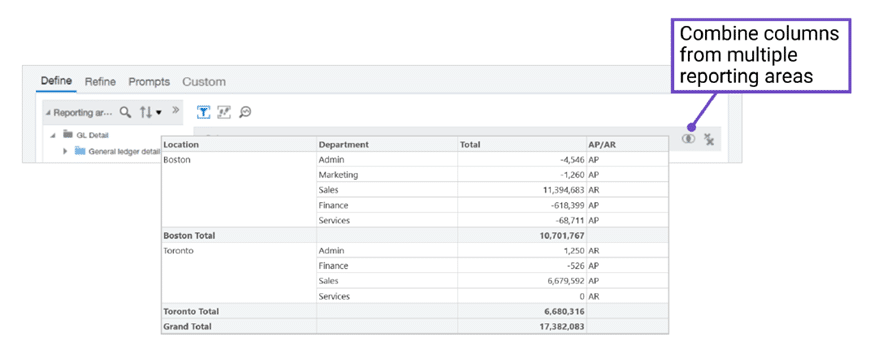
In this example:
- AR Invoices and AP Bills reporting areas are combined.
- Columns mapped between the reporting areas include Location, Department, and Amount.
- An additional field was created to indicate if the data is from AR or AP.
After selecting an additional reporting area, choose an operation: Union, Union All, Intersect, or Minus. Then, map columns from the additional reporting area to the original.
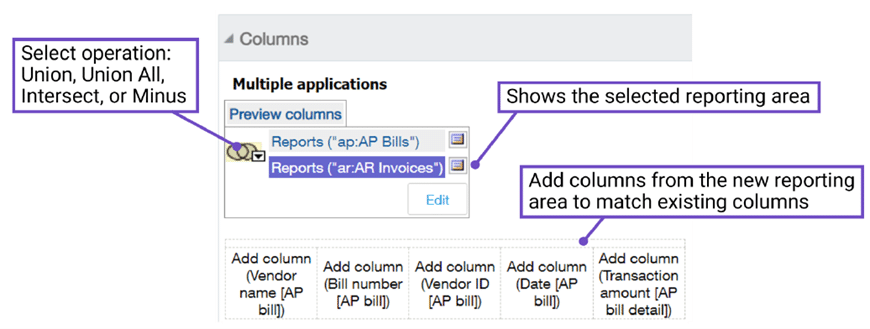
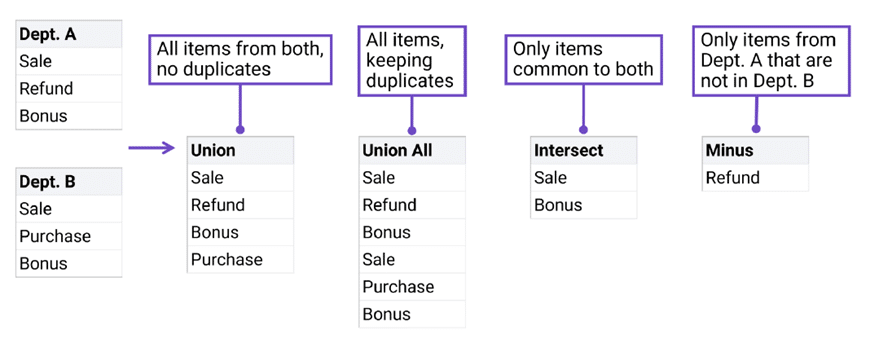
Choose one of the SQL Union operators.
- Union: All items from both reports, no duplicates.
- Union All: All items, keeping duplicates.
- Intersect: Only items common to both.
- Minus: Only items from the initial reporting area column that are not in the additional reporting area column.
Get More Help Designing Sage Intacct Reports
SWK Technologies will help you gain the best value out of your software investment and ensure your integrations, customizations and configurations align with your business goals. Whether you are looking to integrate with other critical applications, streamline and enhance your reporting, or speed up a routine process, we have the expertise and resources to guide you through the process.
Contact SWK Technologies today to talk through your Sage Intacct reporting needs and learn more about the automation features in this modern cloud accounting software.