
• Skip to main content
  • Skip to header right navigation
  • Skip to site footer
  • X
  • Facebook
  • YouTube
  • LinkedIn
Screen Connect
Support
Customer Portal
Pay Online
SWK logo.

SWK Technologies

Software Solutions & Services

  • Accounting & ERP Software
      • Acumatica Cloud ERP
        • Overview
        • Construction
        • Distribution
        • Field Service
        • Financial Management
        • Manufacturing
        • Professional Services
        • Project Accounting
        • Retail-Commerce
      • Sage Intacct
        • Overview
        • Construction and Real Estate (CRE)
        • Distribution Operations for Sage Intacct
        • Financial Services
        • Healthcare
        • Manufacturing Operations for Sage Intacct
        • Nonprofits
        • Professional Services
        • Sage Intacct Payroll powered by ADP
      • Sage 100
        • Overview
        • Business Intelligence
        • Core Accounting & Financials
        • Distribution
        • Manufacturing
        • Payroll
        • Sage 100 Contractor
      • More Accounting Products
        • QuickBooks
        • Sage 50
        • Sage 300
        • Sage 500
        • Sage BusinessWorks
      • ERP Add-ons
        • ADP Workforce Now
        • Altec
        • Avalara
        • AvidXchange
        • BigCommerce
        • CIMCloud
        • Cloud Hosting
        • DataSelf
        • Fortis
        • FreightPOP
        • Lumber
        • Microsoft 365
        • Netstock
        • Ottimate
        • Quadient
        • Sage Fixed Assets
        • Sage HRMS
        • Sage Intacct Payroll powered by ADP
        • Savant WMS
        • Endpoint Automation Solutions (FKA Scanco)
        • ScanForce
        • Solver
        • SPS Commerce
        • Velixo
        • Workforce Go!
      • More ERP Add-ons
        • Bizinsight
        • Concur
        • Crystal Reports
        • Fraxion
        • Fusion RMS
        • FYISoft
        • JobOps
        • KnowledgeSync
        • Lockstep Collect
        • Nectari
        • Pacejet
        • Planning Maestro
        • Sage CRM
        • Sage Intelligence
        • Sage Supply Chain Intelligence
        • Scissortail HCM
        • Service Pro
        • ShipStation
        • Shopify
        • Starship
        • Sugar CRM
        • Time & Billing Pro
        • Timekeeper
        • True Sky
      • Industries
        • Construction
        • Distribution
        • Financial Services
        • Healthcare
        • Manufacturing
        • Nonprofit
        • Professional Services
        • Retail
  • Managed Cloud Services
      • Managed IT Services
        • Managed Cloud Services
        • Network Assurance Core
        • Email Hosting
        • IT Support
        • Microsoft 365 Services
        • Server Monitoring
        • Virtualization
      • Cybersecurity
          • CyberAssurance CORE™
          • Cybersecurity Solutions
          • Backup & Continuity
          • Dark Web Monitoring
          • EDR
          • Encryption
          • MFA
          • Penetration Testing
          • Security Training
          • Spam & Virus Filtering
          • vCIO
          • Vulnerability Assessment
      • Cloud Services
        • Cloud Hosting
        • Infrastructure-as-a-Service
        • Acumatica IaaS
      • Industries
        • Financial Services
        • Healthcare
        • Construction
      • Locations
          • Nationwide
          • Austin
          • California
          • Chicago
          • Minneapolis
          • New Jersey
          • New York
          • North Carolina
          • Philadelphia
          • Phoenix
          • San Diego
          • Seattle
  • Consulting & Implementation
    • Business Technology Consulting
    • eCommerce
    • Financing
    • Human Capital Management
    • Managed Cloud & IT Services
    • Partner Program
    • Software Development
    • Software Implementation
  • Resources
    • Help Desk
    • Blog Posts
    • Payments Portal
    • Webinars
    • YouTube Channels
    • Acumatica Resources
    • Sage Intacct Resources
    • Sage 100 Resources
    • IT Resource Pages
  • About
    • About SWK
    • Awards & Recognition
    • Life@SWK
    • Careers
    • Success Stories
    • SWK Gives
  • Contact
    • Contact Us
    • Support
    • Our Locations

The Difference Between HDD and SSD

December 10, 2018 by Hector

Home » Blog » The Difference Between HDD and SSD

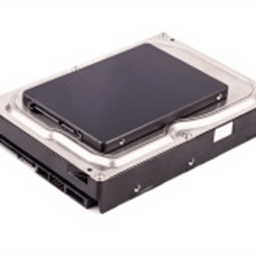
The difference between HDD and SSDThe standard hard disk drive (HDD) has been the predominant storage device for desktop computers and laptops for a long time. But now, with the invention of solid state drive (SSD) technology, computer buyers and users have access to the latest innovation that’s setting new trends in the storage market. So which one should you go for – the HDD or SSD? Read on to find out.

What is an HDD?

A hard disk drive (HDD) is basically a storage device in a computer. It is comprised of metal platters with magnetic coating, spindle, and various moving parts to process and store data. The common size for laptop hard drives is the 2.5” model, while a larger 3.5” model is usually found in desktop computers.

What is an SSD?

A solid state drive (SSD) is another type of data storage that performs the same job as an HDD. But instead of storing data in a magnetic coating on top of platters, an SSD uses flash memory chips and an embedded processor to store, retrieve, and cache data. It is roughly about the same size as a typical HDD, and bears a resemblance to a smartphone battery.

HDD and SSD Comparison

Now let’s take a closer look at the two devices. We break it down into the following main categories:

Speed

This is where SSDs truly prevail. While HDDs need a long time to access data and files because the disk must spin to find it, SSDs are up to 100 times faster since data can be accessed instantly. This is why an SSD-equipped PC will boot within seconds and deliver blazing fast speed for launching programs and applications, whereas a computer that uses an HDD will take much longer to boot the operating system—and it will continue to perform slower than an SSD during normal use.

Capacity

As of writing, SSD units top out at 16TB storage capacity. Although there are large SSDs, anything that’s over 512GB is beyond most people’s price range. HDDs, on the other hand, have large capacities (1-2TB) available for much more affordable prices.

Durability

HDDs consist of various moving parts and components, making them susceptible to shock and damage. The longer you use your HDD, the more they wear down and most eventually end up failing. Meanwhile, an SSD uses a non-mechanical design of flash storage mounted on a circuit board, providing better performance and reliability, and making it more likely to keep your files and data safe.

Noise

An HDD can sometimes be the loudest part of your computer. Even the highest-performing HDDs will emit some noise when the drive is spinning back and forth to process data. SSDs have no moving parts, meaning it makes no noise at all.

Heat

More moving part means more heat, and HDD users will have to live with the fact that their device will degenerate over time. SSD uses flash memory, generating less heat and helping to increase its lifespan.

Cost

To be frank, SSDs are much more expensive than HDDs for the same capacity. This is why most computers with an SSD only have a few hundred gigabytes of storage. SSDs are about twice the cost of HDDs. Despite the high costs and low capacity, SSD is a clear winner over HDD in terms of performance. While you’re paying more for less memory with an SSD, you’re investing in a faster and far more durable data-storage option in the long run.

We recommend using an SSD as the primary storage for your operating system, applications, and most-used programs. You can install another HDD inside the same computer to store documents, movies, music, and pictures – these files don’t need to leverage the incredible access times and speed of SSD.

Contact the experts at SWK Network Services to help you decide which hardware provides the most value for your business.


[fc id=’34’][/fc]

Category: Blog, IT ServicesTag: Network Services

Sidebar

Recent Posts

  • How to Set Up AI Studio in Acumatica 2025 R2
  • A Brief History of the Dark Web
  • How to Combine Reporting Areas in Sage Intacct ICRW
  • Rooted in Growth: How Acumatica and SWK Technologies Helped a Commercial Landscaper Scale Smarter
  • SWK Technologies February 2026 Cybersecurity News Recap
  • Sage Intacct 2026 R1: Strategic Insights for the Modern Finance Leader
  • SWK Technologies Named to CRN MSP 500 List for 2026

Categories

Ready to take the next step?

Contact SWK today to get in touch with one of our experts. We’ll go over your business challenges and unique needs, and see where you can unlock new value from your technology and make your operations run easier.

Get in touch!

Our Latest Posts

Acumatica AI Studio LLM Prompts screen for ‘STOCK-ITEM-DESC – Stock Item Description.’ The form shows fields for Prompt ID, Prompt Name, LLM Connection, Source Form, and a Button Name of ‘Generate Description.’ The Instructions tab is open, containing markdown-style context and instructions that reference inventory fields and output requirements, with an Output Format tab and a Prompt Testing panel visible on the right side of the screen.

How to Set Up AI Studio in Acumatica 2025 R2

Read moreHow to Set Up AI Studio in Acumatica 2025 R2
Hands typing on a laptop emitting blue light in a dark room, representing activity on the dark web.

A Brief History of the Dark Web

Read moreA Brief History of the Dark Web
Diagram illustrating Sage Intacct union operations with two departments. Shows four operation types: Union (combines all items without duplicates), Union All (combines all items keeping duplicates), Intersect (shows only common items), and Minus (shows items unique to first department). Example uses transaction types like Sale, Refund, Purchase, and Bonus.

How to Combine Reporting Areas in Sage Intacct ICRW

Read moreHow to Combine Reporting Areas in Sage Intacct ICRW

Awards and Accreditations

Top work places in NJ 2020.
Acumatica the Cloud ERP gold certified partner.
The Gold Microsoft partner logo on a black background.
Sage business partner diamond logo.
Dell Technologies Gold Partner
Sage tech partner logo.

Stay in the know!

Subscribe for exclusive ERP, process automation, IT and cybersecurity news.

Twitter
  • Facebook
  • YouTube
  • LinkedIn

Home
About
Contact

Support
Screen Connect
Pay Online
Downloads

SWK logo.

Headquarters:
120 Eagle Rock Ave, Suite 330
East Hanover, NJ 07936

Contact:
info@swktech.com
(877) 979-5462

Copyright © 2026 · SWK Technologies, Inc. · All Rights Reserved · Terms of Use · Privacy Policy

This site uses cookies to collect information about your browsing activities in order to provide you with more relevant content and promotional materials, and help us understand your interests and enhance the site. By continuing to browse this site you agree to the use of cookies. Visit our privacy policy to learn more.