
• Skip to main content
  • Skip to header right navigation
  • Skip to site footer
  • X
  • Facebook
  • YouTube
  • LinkedIn
Screen Connect
Support
Customer Portal
Pay Online
SWK logo.

SWK Technologies

Software Solutions & Services

  • Accounting & ERP Software
      • Acumatica Cloud ERP
        • Overview
        • Construction
        • Distribution
        • Field Service
        • Financial Management
        • Manufacturing
        • Professional Services
        • Project Accounting
        • Retail-Commerce
      • Sage Intacct
        • Overview
        • Construction and Real Estate (CRE)
        • Distribution Operations for Sage Intacct
        • Financial Services
        • Healthcare
        • Manufacturing Operations for Sage Intacct
        • Nonprofits
        • Professional Services
        • Sage Intacct Payroll powered by ADP
      • Sage 100
        • Overview
        • Business Intelligence
        • Core Accounting & Financials
        • Distribution
        • Manufacturing
        • Payroll
        • Sage 100 Contractor
      • More Accounting Products
        • QuickBooks
        • Sage 50
        • Sage 300
        • Sage 500
        • Sage BusinessWorks
      • ERP Add-ons
        • ADP Workforce Now
        • Avalara
        • AvidXchange
        • BILL
        • BigCommerce
        • CIMCloud
        • Cloud Hosting
        • DataSelf
        • DocLink
        • Fortis
        • FreightPOP
        • Lumber
        • Microsoft 365
        • Netstock
        • Quadient
        • Sage Fixed Assets
        • Sage HCM
        • Sage Intacct Payroll powered by ADP
        • Sage Supply Chain Intelligence
        • Savant WMS
        • Endpoint Automation Solutions
        • ScanForce
        • Solver
        • SPS Commerce
        • Velixo
        • Workforce Go!
      • More ERP Add-ons
        • Bizinsight
        • Concur
        • Crystal Reports
        • Fraxion
        • Fusion RMS
        • FYISoft
        • JobOps
        • KnowledgeSync
        • Lockstep Collect
        • Nuvei
        • Nectari
        • Ottimate
        • Pacejet
        • Planning Maestro
        • Sage CRM
        • Sage HRMS
        • Sage Intelligence
        • Scissortail HCM
        • Service Pro
        • ShipStation
        • Shopify
        • Starship
        • Sugar CRM
        • Time & Billing Pro
        • Timekeeper
        • True Sky
      • Industries
        • Construction
        • Distribution
        • Financial Services
        • Healthcare
        • Manufacturing
        • Nonprofit
        • Professional Services
        • Retail
  • Managed Cloud Services
      • Managed IT Services
        • Managed Cloud Services
        • Network Assurance Core
        • Email Hosting
        • IT Support
        • Microsoft 365 Services
        • Server Monitoring
        • Virtualization
      • Cybersecurity
          • CyberAssurance CORE™
          • Cybersecurity Solutions
          • Backup & Continuity
          • Compliance
          • Dark Web Monitoring
          • EDR
          • Encryption
          • MDR
          • MFA
          • Penetration Testing
          • Security Training
          • SOC
          • Spam & Virus Filtering
          • vCIO
          • Vulnerability Assessment
      • Cloud Services
        • Cloud Hosting
        • Infrastructure-as-a-Service
        • Acumatica IaaS
      • Industries
        • Financial Services
        • Healthcare
        • Construction
      • Locations
          • Nationwide
          • Austin
          • California
          • Chicago
          • Minneapolis
          • New Jersey
          • New York
          • North Carolina
          • Philadelphia
          • Phoenix
          • San Diego
          • Seattle
  • Consulting & Implementation
    • Business Technology Consulting
    • eCommerce
    • Financing
    • Human Capital Management
    • Managed Cloud & IT Services
    • Partner Program
    • Software Development
    • Software Implementation
  • Resources
    • Help Desk
    • Blog Posts
    • Payments Portal
    • Webinars
    • YouTube Channels
    • Acumatica Resources
    • Sage Intacct Resources
    • Sage 100 Resources
    • IT Resource Pages
  • About
    • About SWK
    • Awards & Recognition
    • Life@SWK
    • Careers
    • Success Stories
    • SWK Gives
  • Contact
    • Contact Us
    • Support
    • Our Locations

Sage HRMS: Benefit Letters in Employee Self-Service

July 22, 2024 by Hector Bonilla

Home » HR and Payroll » Sage HRMS: Benefit Letters in Employee Self-Service

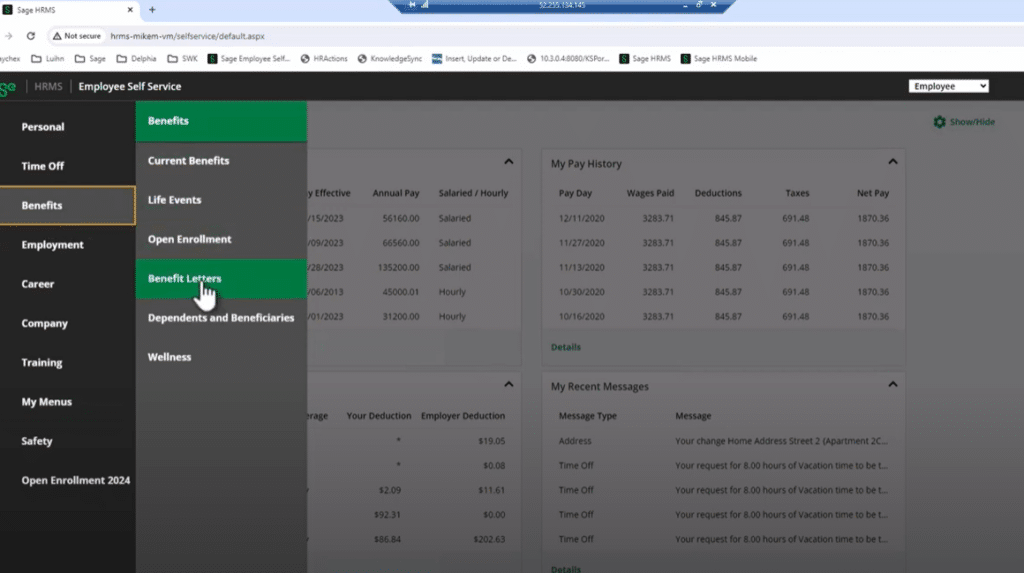
A screenshot the Benefits tab in Sage HRMS showing how to access the Benefits Letters feature before exporting letters for Employee Self-Service

The Benefit Letter option in Sage HRMS allows you to prepare letters showing the benefits set up for employees. In this video from the HCM team at SWK Technologies, our experts show you how to manage, export and publish benefit letters for Sage HRMS Employee Self-Service use for any number of employees.

In this video, SWK’s HCM team covers:

  1. Navigating to the Benefits section and understanding the need to publish benefit letters (0:08)
  2. Steps to create and export benefit letters from Sage HRMS to ESS:
    1. Accessing benefit reports and setting criteria (0:25)
    1. Exporting benefit letters to ESS (0:54)
  3. Viewing published benefit letters in ESS (1:26)
  4. Benefits of providing detailed benefit statements to employees (1:39)

Watch the video or continuing reading below to learn more:

How to Manage and Export Benefit Letters in Sage HRMS

We have had multiple clients ask about the Benefit Letters option under the Benefits menu in Employee Self-Service (ESS). This guide will walk you through the process of creating and exporting benefit letters from Sage HRMS to make them available to your employees.

Accessing Benefit Letters in Employee Self-Service

When employees click on the Benefits menu in Employee Self-Service, they’ll see a “Benefit Letters” option. Initially, there may be nothing available because no letters have been published yet. A hint under the light bulb icon indicates that you need to create and export letters from HRMS to make them accessible.

Creating and Exporting Benefit Letters in Sage HRMS

To create and export benefit letters, follow these steps:

  1. In Sage HRMS, navigate to Reports > Benefit Reports > Benefit Letter
  2. Set your standard criteria for the group you want to publish letters for. This could include an entire employer, division, department, or any specific group
  3. Choose the employee statuses you want to include (e.g., active, leave of absence, terminated). Typically, this will be for active employees only
  4. Determine the letter closing name, job title, and effective date
  5. Click on the Export option
  6. In the export menu, select “Export to Employee Self-Service” along with any other desired options
  7. Click “Export” to begin the process

Export Process

After initiating the export:

  1. The system will inform you how many benefit letters it will generate based on your criteria
  2. Confirm that you want to proceed with the export
  3. A progress bar will appear, showing the status of the export process
  4. The duration of the export depends on the number of employees included. For example, 34 employees may process quickly, while 600 will take longer
  5. Once completed, click “OK” to finish the process

Viewing Benefit Letters in Employee Self-Service

After the export is complete:

  1. When employees log into Employee Self-Service and navigate to Benefits > Benefit Letters, they will see their published benefit letter
  2. Employees can click on the letter to open it, download it, or print it

Content of the Benefit Letter

The benefit letter provides employees with a comprehensive overview of their benefits, including:

  1. Coverage details
  2. Employee contributions
  3. Employer contributions
  4. Additional compensation based on the employer-paid portion of benefits
  5. A closing statement with the employee’s name and title

Learn More About Sage HRMS Benefits and Employee Self-Service

Discover what else Benefits and other modules in Sage HRMS can do – including HRMS Payroll, HR Actions and Alerts & Workflows – by getting in touch with SWK’s Human Capital Management consulting team. Our experts will work closely with you to transform your operations and ensure that you are getting the most out of your software investment.

Contact SWK here to learn more about Sage HRMS and maximize your ROI on your HR and payroll solutions.

Contact Us

Category: HR and Payroll, Blog, Tips and Tricks

Sidebar

Recent Posts

  • What CMMC 2.0 Changes for Your Cybersecurity Compliance
  • Sage Intacct vs. Microsoft Dynamics GP
  • Which Microsoft Copilot Plan is Right for You?
  • Sage Intacct vs Sage 50 – Top 13 Differences
  • AI in ERP: Cutting Down on Manual Accounting Tasks
  • How Pre-Contract Procurement in Construction Creates Financial Blind Spots
  • Sage 100 2026.0 Release Feature Guide

Categories

Ready to take the next step?

Contact SWK today to get in touch with one of our experts. We’ll go over your business challenges and unique needs, and see where you can unlock new value from your technology and make your operations run easier.

Get in touch!

Our Latest Posts

Write Alt Text for this image. 1:50 PM Claude responded: Close-up of a dark green vintage typewriter with a sheet of white paper loaded into the carriage, printed with the words "NATIONAL SECURITY" in bold uppercase … Close-up of a dark green vintage typewriter with a sheet of white paper loaded into the carriage, printed with the words "NATIONAL SECURITY" in bold uppercase black letters, set against a dark wood surface.

What CMMC 2.0 Changes for Your Cybersecurity Compliance

Read moreWhat CMMC 2.0 Changes for Your Cybersecurity Compliance
Sage Intacct vs. Microsoft Dynamics GP cloud ERP comparison

Sage Intacct vs. Microsoft Dynamics GP

Read moreSage Intacct vs. Microsoft Dynamics GP
A 3D rendering of the Microsoft 365 Copilot app icon, shown as a white rounded square tilted at an angle with the multicolored Copilot logo on its face, casting a shadow on a red-to-blue gradient background.

Which Microsoft Copilot Plan is Right for You?

Read moreWhich Microsoft Copilot Plan is Right for You?

Awards and Accreditations

Top work places in NJ 2020.
Acumatica the Cloud ERP gold certified partner.
The Gold Microsoft partner logo on a black background.
Sage business partner diamond logo.
Dell Technologies Gold Partner
Sage tech partner logo.

Stay in the know!

Subscribe for exclusive ERP, process automation, IT and cybersecurity news.

Twitter
  • Facebook
  • YouTube
  • LinkedIn

Home
About
Contact

Support
Screen Connect
Pay Online
Downloads

SWK logo.

Headquarters:
120 Eagle Rock Ave, Suite 330
East Hanover, NJ 07936

Contact:
info@swktech.com
(877) 979-5462

Copyright © 2026 · SWK Technologies, Inc. · All Rights Reserved · Terms of Use · Privacy Policy

This site uses cookies to collect information about your browsing activities in order to provide you with more relevant content and promotional materials, and help us understand your interests and enhance the site. By continuing to browse this site you agree to the use of cookies. Visit our privacy policy to learn more.