
Preserving data integrity for your HR and payroll software becomes even more important when you use web-based applications within your Sage HRMS system, such as Employee Self-Service (ESS) and Manager Self-Service. The HCM team at SWK Technologies has put together a quick How-To Guide video here to walk you through all the steps required for validating and assigning managers to employees and departments in your human resource management system.
Watch the video below from SWK’s “Sage HRMS in Action” series or continue reading below for a step-by-step breakdown of how to identify and correct invalid manager assignments using the tools available in your HR and payroll software:
Why Manager Assignments Matter in Sage HRMS
Who an employee reports to determines what access that manager holds across web-based Sage HRMS — including timekeeping, personnel records, and data visibility in ESS platforms. An incorrect or outdated supervisor assignment can expose data to the wrong person, restrict access for the right one, or introduce reporting errors that compound over time.
Common problems include managers with missing email addresses, employees whose supervisor has since been terminated, and records where no supervisor exists because the employee holds the top position in the reporting chain (such as a company president). All three scenarios appear in the demonstration.
Using HR Analytics to Identify Invalid Manager Assignments
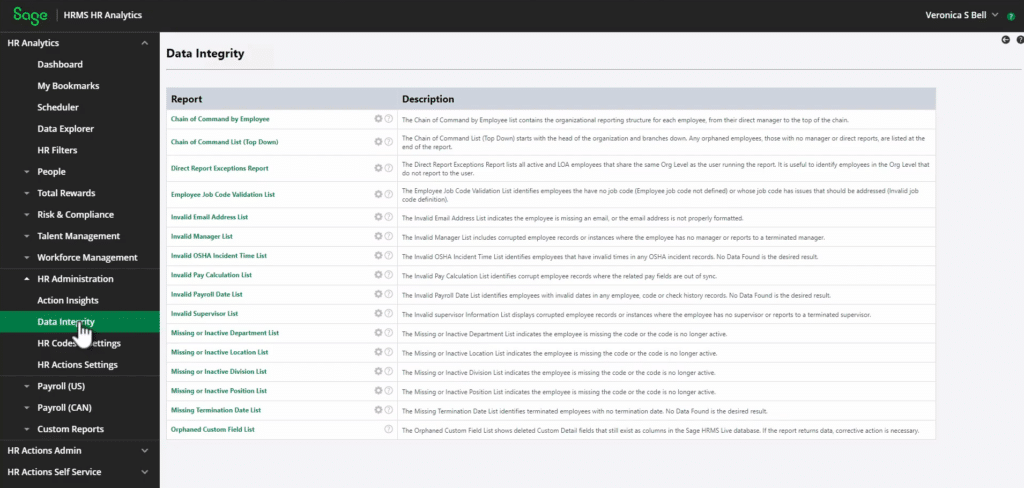
For users with the HR Actions add-on module for Sage HRMS, the HR Analytics component includes a dedicated Data Integrity report group within HR Administration. This module provides enhanced reporting capabilities and ships with a set of standard reports useful for routine audits.
The specific report to run is the Invalid Manager List. Accessible through HR Analytics > HR Administration > Data Integrity, this report surfaces employees with assignment issues — including missing manager email addresses, employees reporting to inactive or terminated supervisors, and other data inconsistencies.
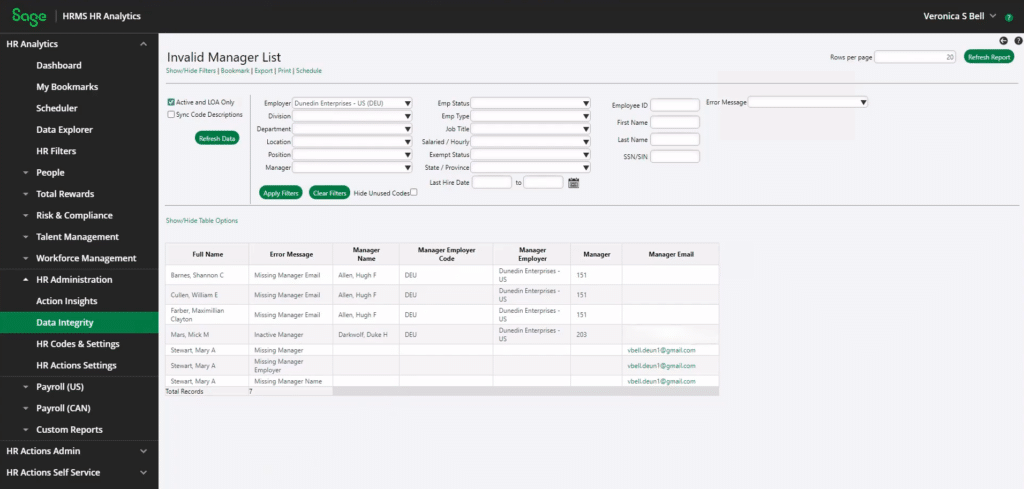
In the demonstration, filtering the report by employer surfaces three issues:
- Several employees reporting to a manager (Hugh Allen) whose email address is missing from his record
- An active employee (Mick Mars) whose assigned supervisor (Duke Darkwolf) has been terminated
- The company president, who reports to no one — an expected and valid result requiring no correction
For businesses that do not use HR Analytics, similar results can be obtained by building custom reports in Secure Query or Crystal Reports, though this requires additional configuration.
Correcting Invalid Assignment Methods
Once issues are identified, Sage HRMS offers three paths to resolution depending on the number of affected records and available modules:
- Manual updates are appropriate for isolated corrections involving a small number of records.
- Mass Update works well for mid-volume changes where HR Actions is unavailable, provided data is backed up first.
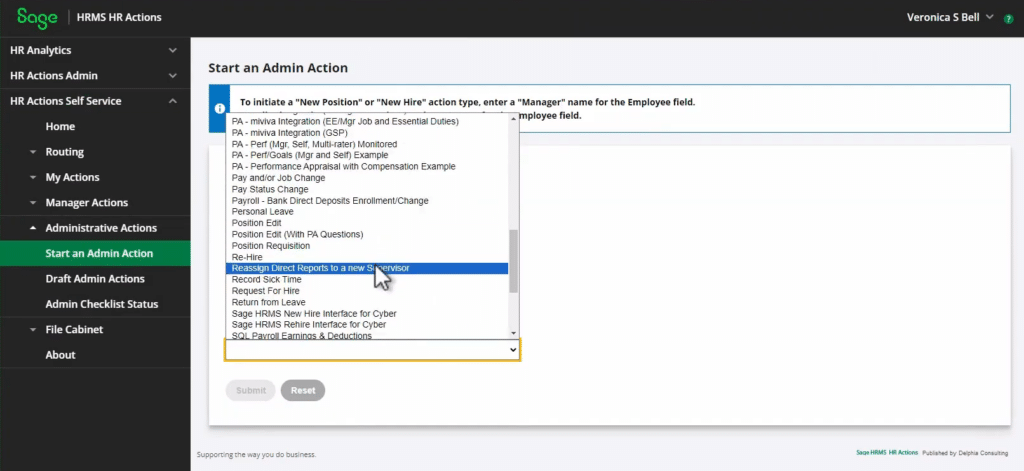
- For users with HR Actions, the built-in reassignment form is the most efficient path for any change involving multiple direct reports — whether the trigger is a promotion, transfer or termination.
1. Manual Updates
The most straightforward correction method is to open each affected employee record individually and update the supervisor field. This approach works well when only a handful of records need adjustment. In the demo, Hugh Allen’s missing email is added directly through his Demographics record, and Mick Mars’s supervisor is updated from the terminated Duke Darkwolf to Veronica Bell. When prompted to create a job history entry, the choice depends on context: if the change corrects a data error, creating a history record is optional; if it reflects an actual employment event that was missed, the history should be recorded with an appropriate reason code and effective date.
2. Mass Update
For larger volumes of affected employees, the Mass Update function under the Processes menu allows changes to multiple records simultaneously. The critical fields to update in a supervisor reassignment are the Supervisor ID and Supervisor Company. Running Import Calculations after the update synchronizes related fields. The demonstration notes that while mass updates are efficient, they carry risk — a backup of the database is recommended before proceeding, and SWK support is available to walk through the process for clients who are uncertain.
3. HR Actions
The most efficient method for large-scale reassignments is the HR Actions module, specifically through the Transfer to New Supervisor and/or Organization form. This form allows an administrator to pull up a departing or promoted supervisor, view all employees currently reporting to that person, designate a new supervisor for the entire group, and submit the change in a single action.
When the action is processed and pushed back to the HRMS database, every affected employee’s record updates simultaneously. The system also creates job history entries for each employee with the selected reason code (such as “Change of Supervisor”) and the form’s effective date — eliminating the need for individual record updates.
This functionality applies beyond standalone HR Administration use cases. The same reassignment capability is built into promotion and termination forms, meaning that when a supervisor is promoted or exits the company, the direct report update can be incorporated into the same workflow rather than handled as a separate task.
Get Support for Sage HRMS with SWK Technologies
SWK Technologies offers a range of support and consulting services for Sage HRMS users, including assistance with data integrity reviews, Mass Update workflows and HR Actions configuration. Whether the need is a one-time correction or a plan for managing supervisor transitions going forward, the SWK HCM team can help.
Contact SWK here to learn more about how our HR and payroll consultants can help you maintain data accuracy in your Sage HRMS environment.