

If your business uses Microsoft 365, you already have access to some version of Microsoft Copilot — even if no one on your team has opened it yet. What you may not know is that “Copilot” is not a single product, but a set of artificial intelligence capabilities built across the M365 ecosystem, with different solutions designed for different existing licenses, different levels of need and different budgets.
SWK Technologies has put together this guide to break down each Microsoft Copilot option available to Microsoft 365 Business and Enterprise customers — what each one does, who it is for and how to evaluate which configuration fits your business:
What is Microsoft Copilot?
Copilot is an AI assistant built into the Microsoft and Windows ecosystems, including for personal, government and commercial Microsoft 365 licenses. It uses a large language model (LLM) to help users draft documents, analyze data, summarize email threads, generate content and automate repetitive tasks — all within the applications already part of your M365 plan, including Word, Excel, PowerPoint, Outlook and Teams.
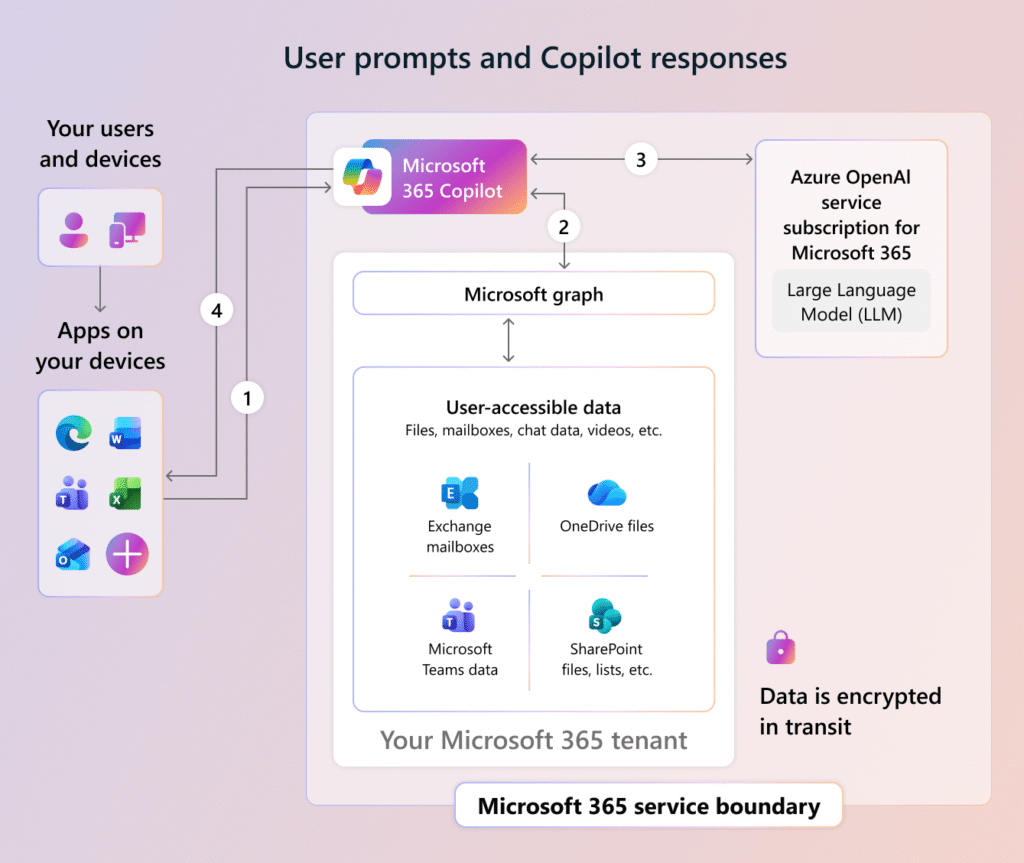
The distinction that matters most for Microsoft 365 Business and Enterprise customers is where Copilot pulls its information from. The free version is mainly a chatbot that primarily uses publicly-available information on the web to generate responses, although users are able to upload documents or grant limited access to shared files with the right permission settings. The paid tier connects to your business’s own emails, documents, calendar, Teams conversations and SharePoint files through the Microsoft Graph, giving it access to the data points generated within your M365 environment.
Microsoft 365 Copilot Plans
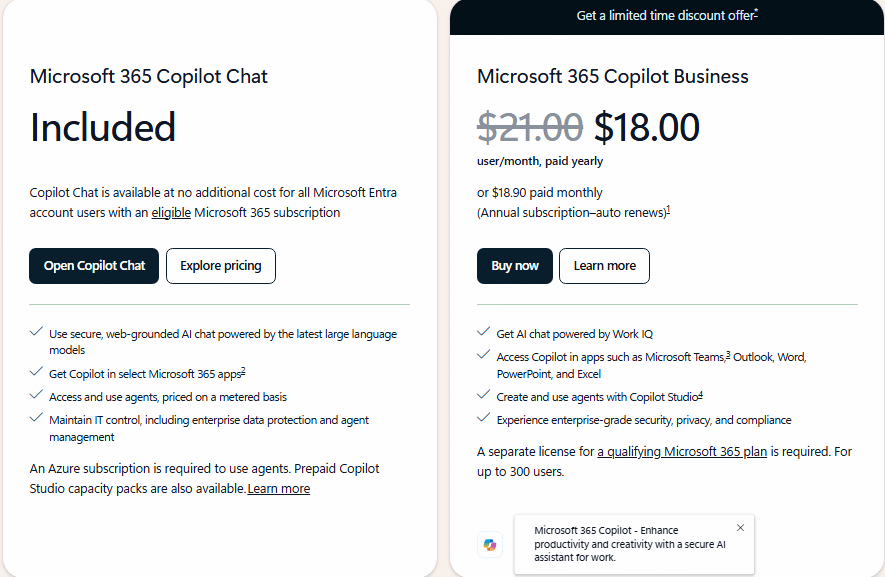
There are two main Copilot offerings for commercial license customers: Copilot Chat (what is left of the original Bing Chat) and Microsoft 365 Copilot. The former is a free version of the chatbot available through the M365 Copilot app, Outlook and other interfaces, while the latter is a paid add-on for new and existing M365 plans. There is also Microsoft Copilot Studio, a separate platform for building custom AI agents that runs on consumption-based pricing and requires an Azure subscription.
| Plan | Cost* | Base Plan Required | Key Capabilities |
| Copilot Chat | Included | Any eligible M365 subscription | Secure web-grounded AI chat; file upload; Copilot Pages; image generation; metered agents (Azure required) |
| M365 Copilot Business | $21.00/user/mo — annual commitment | M365 Business Basic, Standard, Premium or Apps for Business | Everything in Copilot Chat + Work IQ; Copilot in Word, Excel, PowerPoint, Outlook, OneNote, Teams; meeting summaries; AI Search; Notebooks; pre-built agents; agent use included; Copilot Analytics |
| M365 Copilot for Enterprise | $30.00/user/mo — annual commitment | M365 E3, E5, F1, F3, Office 365 plans + Teams, Exchange and SharePoint licenses | Everything in Copilot Business + enterprise-grade governance controls; Microsoft Purview compliance integration; expanded eligibility across Office 365, Teams, Exchange, SharePoint and other qualifying plans |
| Microsoft Copilot Studio | Consumption-based (pre-purchase or pay-as-you-go) | Azure + any M365 plan with Copilot Chat (metered) or M365 Copilot license | Build and deploy custom AI agents; connect to external systems; publish to Teams, websites, apps; Power Automate integration |
*Pricing reflects rates currently listed by Microsoft for existing Microsoft 365 Business and Enterprise accounts with no discounts applied.
Microsoft Copilot Chat
Microsoft Copilot Chat is a secure, web-grounded AI assistant accessible through certain applications like Outlook (dependent on your license), the M365 Copilot app itself and in the Edge browser sidebar where enabled by your tenant configuration. Users can ask questions, generate content, upload files for analysis, create Copilot Pages and produce images — within a protected environment that keeps your data out of external AI training pipelines. Chat is included at no additional cost for any Microsoft 365 subscriber with an Entra account.
It should be noted that this free version of Copilot is not a complete AI solution and cannot execute many of the same actions that Microsoft 365 Copilot does like retrieve emails, scan SharePoint or summarize Teams meetings on its own. Users can work around this by uploading files into the prompt and pay-as-you-go agents with access to organizational data are available on a metered basis — though those require an Azure subscription and incur consumption-based charges.
Microsoft 365 Copilot
Microsoft 365 Copilot is the paid version that unlocks the full AI experience across the M365 suite. Where Copilot Chat works from web information alone, the paid M365 Copilot license unlocks more of the artificial intelligence layer grounded in your business’s actual data through Microsoft Graph, including your emails, calendar, Teams messages, SharePoint files and OneDrive documents. The internal Search tool also leverages AI to be able to sort through data, including from connectors where applicable through the API.
With an existing Microsoft 365 subscription and a paid Copilot license, the tool also becomes available inside Word, Excel, PowerPoint, Outlook, OneNote and Teams, each with capabilities tailored to the context of that application. Here are a few examples of how Microsoft Copilot can interact with your built-in apps:
- Teams – generates meeting summaries and surfaces action items
- Outlook – drafts replies and synthesizes long email threads
- Excel – interprets natural language queries against your data and builds analyses
The paid license also includes a set of pre-built AI agents — Researcher, Analyst and Facilitator — alongside Copilot Notebooks for gathering and synthesizing project content, SharePoint Advanced Management for site lifecycle and access controls, and Copilot Analytics for measuring usage and adoption across your business.
Microsoft 365 Copilot for M365 Business Plans
Each Business plan qualifies for the Microsoft 365 Copilot Business add-on, the SMB-tier paid license that delivers Copilot’s full feature set within the apps your base plan provides. As of this writing, the Microsoft 365 Copilot Business add-on is priced at $18.00 per user per month on an annual commitment, down from the standard rate of $21.00 per user per month as part of a promotional offer running through June 30, 2026.
New M365 commercial customers* can also purchase convenience bundles that combine a Business plan with the Copilot add-on at a reduced all-in rate, available for a limited time and subject to change. The Business add-on is sold only to existing customers on a qualifying Business plan, while the convenience bundles are reserved for net-new commercial purchases — a distinction worth confirming with your reseller before pricing out a renewal or migration.
*NOTE: Starting July 1,2026, certain Microsoft 365 Business and Enterprise licenses will see increased per seat costs for both annual and monthly plans, applicable to all new subscriptions after this date.
M365 Business Basic + Copilot
M365 Business Basic is the entry-level commercial plan, providing web and mobile versions of the core Office apps along with Teams, Exchange, SharePoint and OneDrive — but no desktop versions of Word, Excel, PowerPoint or Outlook. Adding the M365 Copilot Business add-on activates the full Copilot feature set, including Work IQ grounding, in-app Copilot across the M365 suite, Teams meeting summaries and the agent library.
M365 Business Standard + Copilot
M365 Business Standard adds desktop versions of Word, Excel, PowerPoint, Outlook and other applications on top of Business Basic’s cloud services. It is the most common commercial M365 plan for growing businesses needing both the full desktop productivity suite and Teams-based cloud collaboration. Pairing Business Standard with the M365 Copilot add-on delivers the complete Copilot experience across desktop and web.
M365 Business Premium + Copilot
M365 Business Premium is the highest Business tier, adding Microsoft Intune for device management, Microsoft Defender for Business, advanced identity and access management and data loss prevention on top of Business Standard. It is built for businesses where security, compliance and device governance matter alongside productivity — particularly those managing distributed workforces, sensitive customer data or industry-specific regulatory requirements. Adding M365 Copilot to Business Premium brings the full AI layer into an environment already secured with enterprise-grade controls.
Microsoft 365 Copilot for M365 Enterprise
The M365 Copilot Enterprise add-on is priced at $30.00 per user per month on an annual commitment and delivers the same core capabilities as the Business add-on, with added enterprise-grade governance controls and deeper Microsoft Purview compliance integration suited to regulated and large-scale deployments.
The Microsoft 365 Enterprise add-on does not replace the Business add-on as each is only available for plans on that license tier. Businesses below 300 users typically remain on a Business plan and Copilot Business pairing, while Copilot for Enterprise is positioned for businesses that have outgrown the Business cap or operate in industries where E5-level compliance tooling is already in place. The price gap between the two tiers reflects that audience split rather than a difference in core Copilot functionality, and businesses approaching the 300-user threshold should weigh the timing of an Enterprise migration against their next renewal cycle to avoid paying for capabilities they will not immediately use.
Microsoft 365 E7 + Copilot Wave 3
M365 Enterprise customers should also factor in Microsoft 365 E7 Frontier Suite, the bundled plan that became available May 1, 2026 at $99 per user per month and includes M365 E5, Copilot, the Microsoft Entra Suite and Agent 365 in a single agreement. Purchasing those components separately under July 2026 pricing totals $105 per user per month, so the per-seat math favors E7 for businesses already on or moving to E5 with Copilot.
Microsoft Copilot Studio
Microsoft Copilot Studio is a separate platform for businesses that need to build custom AI agents beyond the pre-built options included with the paid M365 Copilot license. Where Copilot’s built-in agents and Copilot Chat’s metered agents cover most standard productivity tasks, Copilot Studio gives IT teams a low-code canvas for designing agents specific to their own workflows — HR intake, IT helpdesk automation, sales workflows, customer-facing support and cross-system orchestration that reaches outside M365.
Agents built in Copilot Studio can connect to external systems including CRM and ERP platforms, publish to Teams, websites and other channels and automate multi-step workflows through Power Automate (NOTE: an Azure subscription is required to run agents). Standalone purchasing options include a pre-purchase plan using Copilot Credit Commit Units — Microsoft says can reduce costs versus pay-as-you-go — and a pay-as-you-go option for businesses with variable usage or those evaluating the platform before committing.
Which Copilot Option is Best for Your Business?
The right Copilot option depends on where your business is in its AI adoption and which apps your team uses every day. Copilot Chat, included with any qualifying M365 subscription, is the lowest-risk entry point and a practical place for teams to build familiarity with AI-assisted work before adding a paid license. The Microsoft 365 Copilot add-on extends that experience into your business’s own data through Work IQ, with the Business add-on covering Basic, Standard and Premium plans up to 300 users and the Enterprise add-on serving E3, E5 and other qualifying plans without a user cap.
Knowing which combination matches your business is a matter of weighing your existing M365 plan, the apps your team actually uses and the level of AI capability you want layered onto them. The cost difference between Business and Enterprise add-ons is real, but the more consequential decision is whether your underlying plan supports the Copilot experience your team needs to actually use.
Get the Most Out of Your M365 Investment with SWK Technologies
Choosing the right Copilot configuration is one decision — making sure your M365 environment is set up to support it is another. As a Microsoft Gold Partner, SWK Technologies helps organizations like yours evaluate your Microsoft 365 options, manage licensing and ensure the tools in your M365 stack are configured to deliver real value.
Contact SWK here to connect with a Microsoft-certified team member and find out which Copilot plan is the right fit for your business.